


GRADE 10 SCHOOL AND CATEGORY SELECTION CRITERIA
Each learner is expected to select twelve (12) schools for Grade 10 placement:
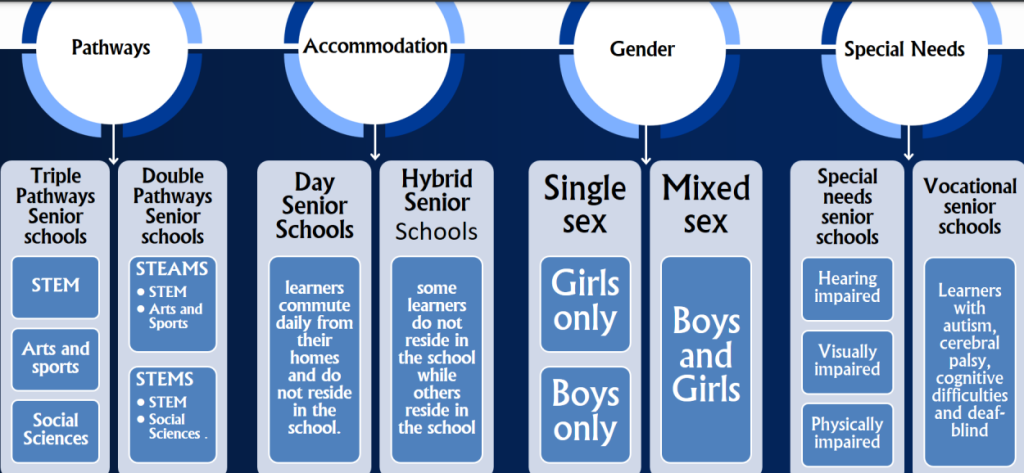
Nine (9) of the twelve schools must be Boarding schools.
Out of these nine, three (3) must be within the learner’s county.
The remaining six (6) should preferably be outside the learner’s county.
The remaining three (3) schools should be Day schools within the learner’s Sub-County.
To meet this requirement, the learner must select schools from all four (4) clusters for each subject combination, as outlined below:
✔ Subject Combination (1)
Cluster 1: Boarding Schools (preferably outside the learner’s county)
Cluster 2: Boarding Schools (preferably outside the learner’s county)
Cluster 3: Boarding/Hybrid Schools (preferably within the learner’s county)
Cluster 4: Day Schools (within the learner’s Sub-County)
✔ Subject Combination (2)
Cluster 1: Boarding Schools (preferably outside the learner’s county)
Cluster 2: Boarding Schools (preferably outside the learner’s county)
Cluster 3: Boarding/Hybrid Schools (preferably within the learner’s county)
Cluster 4: Day Schools (within the learner’s Sub-County)
✔ Subject Combination (3)
Cluster 1: Boarding Schools (preferably outside the learner’s county)
Cluster 2: Boarding Schools (preferably outside the learner’s county)
Cluster 3: Boarding/Hybrid Schools (preferably within the learner’s county)
Cluster 4: Day Schools (within the learner’s Sub-County)
Senior School learners (Grades 10-12) shall take seven (7) subjects; Four (4) are core subjects; English,
Kiswahili/KSL, Community Service Learning and Physical Education. Three (3) shall be selected from
the pathways and tracks of choice
SELECTION OF PATHWAYS AND SENIOR SCHOOLS
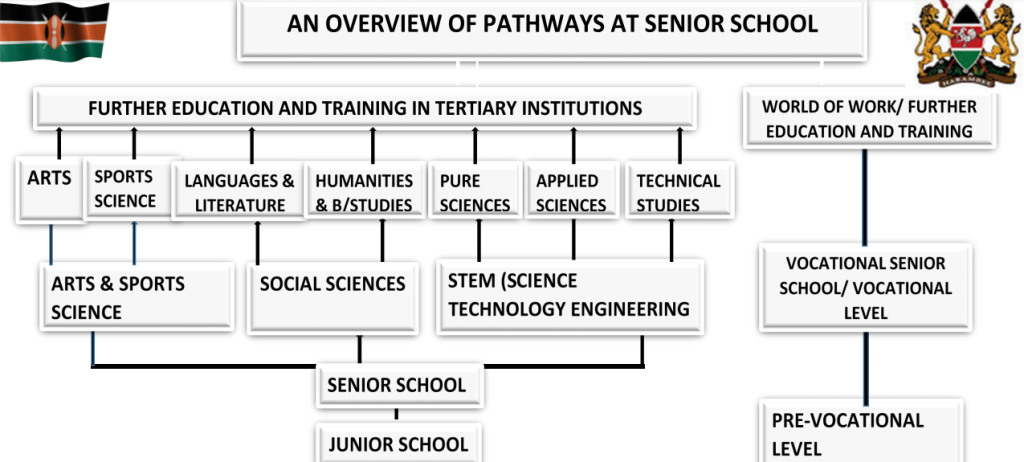
- Determination of pathways per senior school
- Determination of vacancies for boarding and day schooling in senior schools
- Selection of pathways, subjects’ combination and schools by grade 9 learners
- Selection based on pathway
The learner will select 12 schools for their chosen pathway as follows.
– Four (4) schools in first choice track and subject combination
– Four (4) schools in second choice subject combination
– Four (4) schools in third choice subject combination (Total 12 schools)
Selection based on accommodation
Out of the 12 schools selected based on pathway, 9 will be boarding schools; 3 from the learners’ home county, 6 from outside their home county/county of residence.
Three (3) day schools in their home sub county/sub county of residence. (Total 12 schools)
Pre selection – A school that does not allow open placement can apply to be pre-select if it meets the criteria defined by the Ministry of Education

PLACEMENT OF LEARNERS IN GRADE 10
Placement of learners in Grade 10 will be based on;
1) Learners choice
- Pathways
- Tracks
- Subject Combinations
- Schools
2) Merit
- Learners academic performance in Grade 9 assessment
3) Psychometric Tests
- Learner aptitude, interest and talent identification done by Knec and by the school
4) Equity
- Regional balancing to ensure fair access for all learners
5) School Capacity
- Availability of resources and space in respective schools applied for
Top 6 learners per gender in each STEM track per sub-county will be placed for Boarding in
schools of choice

NOTE
- Top 3 learners per gender in each Social Science track per sub-county will be placed for
Boarding in schools of choice - Top 2 learners per gender in each Arts and Sports Science track per sub-county be placed to
Boarding schools of their choice - Placement of Candidates with Achievement Level of averaging 7 and 8 per track to boarding
schools of their choice
ADMISSION AND REPLACEMENT PROCESS
- Placement results will show where learners have been placed
- Admission letters/joining instructions shall be accessed online using the learner’s assessment
Number. - All schools, both public and private shall admit Grade 10 through KEMIS
- No principal shall enter a learner into KEMIS before he/she reports to the school physicaly
- Daily online reporting shall be monitored through KEMIS
Replacements - Schools with vacancies will declare through their respective county directors of education
- Learners who wish to change schools will make requests through the heads of junior schools at least 2 weeks before the official grade 10 reporting date
- Priority shall be given to those who had earlier selected the schools they are requesting for
- Approvals by MoE shall be based on senior schools’ documented capacity
- Upon a request’s approval, the joining instructions shall be accessed online; at no time shall a school
issue printed letters for replacement cases - Replacement will be done once and shall be irreversible
THE AUTOMATED GRADE 10 PATHWAY AND SENIOR SCHOOL SELECTION STEP BY STEP GUIDELINE
Ministry of Education Opens Grade 10 Senior School Selection System
The Ministry of Education officially opened the Grade 10 Senior School Selection System, enabling learners to select schools based on their preferred career pathways under the Competency-Based Curriculum (CBC).
Accessing the portal needs a login username and password through the provided link.
Learners will choose from three pathways:
- STEM (Science, Technology, Engineering, Mathematics)
- Social Sciences
- Creative Arts and Sports
The system helps students explore possible careers tied to each pathway and identifies schools offering the relevant programs.
Teachers and school heads are urged to support students in making informed choices aligned with their talents and career interests.
Parents are encouraged to participate actively to ensure smooth and appropriate placement for all learners.
TAP ON THIS LINK TO LOG IN:
https://selection.education.go.ke/
HOW TO LOG IN
- Go to any browser and search 🔍; senior school selection portal and click first link
- On the landing page click on log in, if you’re using a mobile device, click on three bars on the far right to access login button and click.
- Type in the Junior School NEMIS UIC and it’s password. Please be keen here.
- When prompted to fill the Verification code, kindly use 54321 (Only usable during piloting).
LOGIN SUCCESSFULL - Click on PATHWAY SELECTION If you’re using a Mobile 📲 device, click on the Three dashes on the Far left to access it.
- This action will avail all the KJSEA learners in Grade 9.
- Click on Each Learner at a time and Update their profiles .
- Indicate their special need type if any.
- Check ✔️ or click on those who were present during pathway selection e.g Parent/guardian, HOI, Learner or class teacher.
- Feed the Parent or guardian Information.
- Update Learner Location, i.e Home County and Sub-County, County and Sub-County of Residence.
- Indicate a comment if any. (Optional)
- Click SUBMIT and confirm.
SELECTING LEARNERS PATHWAY
- Pick only ONE PATHWAY for each learner e.g. STEM, Social Sciences or Arts & Sports Science.
- Confirm to proceed.
- You will be provided with a list of Subject Combinations in that parthway and are offered in various Senior Schools across the Country.
- Select only THREE Subject Combinations that suit the Learner.
- Click SUBMIT
PROCEED TO SCHOOL SELECTION
- Click EACH Subject Combination at a time and Proceed to select 4 schools 1 in each of the four clusters.
- Once the 4 Schools are selected for the learner that one combination will disappear.
- Do this for the 3 Subject Combinations.
- Upon Completion. you’ll be able to download or print the learner Profile.
Kindly, DO NOT go to NEMIS this is a separate Platform.
Thank you.